Total Pageviews

Thursday, August 22, 2024

Jumpstarting a drained Toshiba C-50 ASP53xx Battery (Type:PA5024U)

Good News I was able to jumpstart the battery pack that I thought I was going to replace again at 50usd cost. This battery ended up to be of the simple ones that you can jumpstart applying a voltage and current in the + - terminals. 

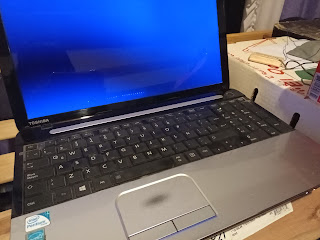
My Toshiba C-50 ASP, main DJing rig
First I recommend checking what has caused your battery to deplete and be useless saying that is 100% charged but when you unplug the charger it shuts off immediately. In my case and probably other cases too, the problem was that the laptop reactivated while it was in the backpack or any other strange circumstance that I am not able to identify, but the most probable culprit is that a couple of times I stored the laptop in a vertical position in where the lid opened and the laptop reactivated until the battery was drained below the critical level.

The problem of this type of battery is that if it is depleted below certain level, the main controller chip seems to fail to receive the necessary voltage in order to work and communicate with the mainboard. If there is no communication between the battery and the laptop, the default state seems to be a false 100% charged reporting thus the mainboard will not provide any charging voltage to the terminals.

In order for the mainboard to activate these terminals, it seems it needs to receive a voltage measurement that corresponds with a somewhat discharged battery, when a battery is below 100% there is a voltage drop and this can be interpreted as x% of remaining level. But if the mainboard receives a voltage below DC 1v, like 0.05v to say an example, it will interpret as the battery is not sending any signal because is 100% charged thus the mainboard will keep on AC power circuit, bypassing the battery circuitry. I'm not an expert but that's how I see this "design bug" happens.

I must give the credit for this tutorial to the author of the video I'm sharing here, that when I watch it I was very skeptical it would work, but thanks Gd I was able to recover my totally drained battery benefiting from the steps shown here:

how to charge the laptop battery without laptop - YouTube

Okay, so take into account this method will not recover the total capacity that is reduced due to letting a li-ion battery drain to zero, that is a very harmful event that may reduce the battery life a lot, for example my battery was 2hs duration when it was new and after several times that it happened, now it only lasts 40min.

1) Prepare a work area with appropriate charging system, you should be able to measure a minimum voltage in the terminals that indicate it's possible to jumpstart it.

2) IMPORTANT Identify the negative terminal in the laptop, that terminal is the one that has full conductivity with GND, for example measuring resistance between this terminal (on the left according to the battery in the position shown in the photo shown above)

3) Applying a small charge to the battery outside the laptop; For me it worked to apply for a couple of minutes (around 4-8') a voltage of 12v @ 1A of DC power with a stabilized DC supply (a router DC adaptor).
This is the charging system I used to jumpstart the battery.


4) Testing if the battery now has a voltage reading; With your multimeter the battery should now read a voltage of 12v (a bit above 10.8v, but it's in margin) so the mainboard will not initiate the charging circuit when measuring this voltage because it equals to a fully charged battery, but in the next step when you remove the charging plug the laptop SHOULD REMAIN POWERED ON!

5) Testing if the battery holds energy to keep the laptop running; So now re-install the battery in the laptop tray; If you arrived to this step, it means the battery is in shape to be jumpstarted, this step is very important because you need to power on the laptop (with the DC power charger connected) to the BIOS (because it's a lower consumption state) and remove DC plug for a couple of seconds to check if it works and reconnect it; Now the laptop should remain running on battery, reconnect DC charging plug immediately.

6) Jumpstarting the charging circuit; you have a few seconds to do this!
- Remove the DC charging plug from the laptop again and the battery will start to drain the little charge you applied to its terminals in those 4-8 minutes, the battery orange LED will start to blink and at this point re-connect the DC charging plug! You have a few seconds, if you don't do it on time the battery would be fully depleted again and the process will fail. In the moment the LED blinks, that's when the circuit has been activated!

7) Finally the laptop should begin to charge the battery again, you will have all three leds ON (Orange Battery LED, POWER, Wi-Fi), wait for a few moments before booting the OS or just turn off the laptop and leave it to charge in powered OFF state. I won't recommend to charge it while using. Maybe you can charge it in standby mode but not while in normal use.

8) To prevent this happening again, DON'T LEAVE YOUR BATTERY in the laptop, store it 80% level and only when you need "UPS" (in my case when I don't have a stable AC power supply like a 2-stroke petrol generator).

The best practice is, unless you have a special system in your laptop that extends the battery life by only charging at 80%, just remove the battery with a decent amount of energy stored, and store it in an appropriate location. Also make sure that the BIOS setting does not allow to power ON the laptop by opening the lid. For now I won't continue investigating what caused the laptop to activate and to drain the battery to ZERO, because last time I checked it was set to hibernate when a critical level was reached.

Another good practice is to change the minimum and critical levels on power settings that are set in vey low levels by default. The low level for a laptop battery should be no less than 50% and the critical level no less than 20%. I've set 80% low level (laptop goes to standby mode) and 50% to critical level in which case it will hibernate.

The original battery pack was damaged.


Monday, December 2, 2019

Numark DJ io timed out driver install error

Problem was quite easy to solve, if you are installing this usb external soundcard under xp, you probably need for sure attach the external 5-6v DC supply. Even more, its recommended to always use dedicated external power supply or 1amp from an USB 3.0 port. Drivers provided by numark on the net we're fine, trouble was this annoying card is power hungry. Specs tells you about a 6v 1A so you can imagine it is not something optional. Amazing mis info from the manufacturer, almost no support from them and we don't know what chip it uses.

Sunday, November 10, 2019

VPN server, Windows 8.1 no funciona.

Problema: Al conectarse desde un smartphone o una pc aunque conecta (50% de los casos desde android) la conexion carece de toda funcionalidad, no se pueden acceder a archivos compartidos ni a escritorio remoto ni mucho menos el cliente puede utilizar nuestra conexion para su privacidad.

Test 1 -  Agarramos un notebook con windows xp y creamos una nueva "incoming connection", los unicos parameros que cambiamos son que el rango de ip del cliente sera del 192.168.0.20 al 192.168.0.30 (el primer lugar es asignado al equipo servidor de la VPN).

Para probarla de manera rapida y sencilla solo usamos el nombre de equipo en la red como direccion ip y para ver si funcionan los archivos compartidos ponemos la ip del servidor que es \\192.168.0.20.

Resultados: Funciona todo menos la conexion a internet.

Test 2 - Volver a crear la VPN Incoming Connection y desactivar el firewall de windows 8.1 en su totalidad. Ahora si funciona la conexion pero es inseguro dejar el firewall apagado teniendo un router con upnp activado, si un virus entra puede usar upnp para abrir el puerto que necesite y destruir nuestro sistema.

Test 3 . Probando conectividad desde el celular
Despues de varios intentos y de haber desconectado el usuario activo pc a pc primero que todo, el dispositivo android del cliente ya esta conectado a la red VPN y puede acceder a su sesion de escritorio remoto en caso de que solo ande compartir archivos o impresoras.

Saturday, September 7, 2019

Conectar un segundo router a un router en puente / bridge (Usando AR-Link Rio Gallegos)

Basicamente solo debemos hacer dos pasos para conectar un router a una red ya existente, desactivar DHCP y cambiar la ip del router secundario. Para este caso nos basamos en el Cablemodem WI-FI Router provisto por el servicio de fibra optica AR-Link disponible en Rio Gallegos, Argentina. Es curioso que este servicio nos provea de 10 megabits por segundo de navegacion (10 Megas / Mbps) cuando el estandar hasta hace un año o dos era el pesimo servicio de Speedy / Telefonica con 512kbps de subida y 1mbps de bajada.

El primer paso es desactivar el DHCP en el router que queremos usar como secundario, una vez que hagamos esto al conectarnos a este router ya no va a responder salvo que tengamos la conexion ethernet lista. Pero para no complicarnos mejor hagamoslo todo paso por paso.

1) Conectemos el router secundario a la corriente y encendamoslo.

2) Para configurarlo necesitaremos preferentemente una notebook conectada a este router a uno de los 4 puertos LAN (no al WAN!)

3) Ingresemos en la notebook usando el browser la direccion ip del router para entrar al menu.

4) Busquemos entre las opciones de red LAN el servidor DHCP del router y desactivemoslo.

5) Una vez desactivado ya no podremos seguir configurandolo hasta que no establezcamos una ip manual en la conexion LAN de la notebook. En este caso usamos un router ENCORE de 150Mbps y la ip manual que usamos es 192.168.0.117. Los demas parametros no son necesarios configurarlos.

6) Ahora cambiemos el segundo parametro en el router, su direccion IP predeterminada, este paso es necesario para que podamos configurar los dos router las veces que necesitemos y no se superpongan las IP de configuracion por el navegador predeterminadas que suelen ser 192.168.1.1 o 192.168.0.1. En este caso el cablemodem utiliza la ip 192.168.0.1 asi que le asignaremos al router secundario la ip 192.168.0.254

7) Por ultimo desconectemos la notebook del router y conectemos ese extremo de cable de red a uno de los 4 puertos del cablemodem.

8) Ya deberiamos tener internet en el router secundario, por si acaso reiniciemos uno o ambos router.

Monday, July 22, 2019

Setting Up a IIS FTP server on Windows 8.1 (Quite Hard!)

As it was in Windows XP, just a few clicks to create an IIS FTP server but this is not the case, although you needed Windows CD-ROM, or the other way around, with Windows 8.1 you don't need any disk but the process is not the same and it may lead to "bugs" if not done properly.

1) Turn on Windows Features or on
2) Mark whole FTP Server and within "Web Management Tools" mark "IIS Management Console", "IIS Management Scripts and Tools" and "IIS Management Service".
3) Now open the IIS Management Console, in this case I use ClassicShell for a classic start menu, is highly recommended.
4) Right Click to add a new FTP Site and fill the boxes with this info, I don't feel very safe sharing through ftp the whole drive.
5) Next step is very important, we don't wanna mess with advanced features, just put basic authentication or you won't be able to log in:
6) to be continuated

Monday, July 1, 2019

Discovered how to fix unspecified error installinc vc_redist for OBS Studio 32bit

Windows 8.1 x64
After trying several things to install the newest version of OBS Studio, a software for live streaming, it appears that solution has been found. Install the UNIVERSAL C RUNTIME.
The files for this were really hard to find, but we found them in an Adobe Premiere support one.

I don-t know what for 64bit version of obs is, for now 32bit is working normally.

https://helpx.adobe.com/es/creative-cloud/kb/vc2015_update.html
Mirror>https://drive.google.com/drive/folders/14w6Xlu8ujYhry8YRFQtUrhvjY1QB9vBr?usp=sharing
A will post a mirror for these files, they are around six update packages, updating windows didn-t work for me. Also tried refreshing windows by recovery options and even reinstalling whole system. It-s a lot of less work that windows can install over the same drive letter unit and sizes are not added, it is supposed that a windows install will not take less thatn 20GB, I had little free space but when installed windows I didn-t get out space error.

to be continued...

Monday, December 3, 2018

Jamas uses Cortar y Pegar (Cut and Paste) al transferir archivos al PC - Android.

Si creiamos que manteniendonos en la memoria interna de los moviles android estabamos seguros, nos equivocamos. Mantenernos lejos del almacenamiento basado en microSD cards es inseguro, pero en la memoria interna tambien pueden ocurrir bugs que lleven a la perdida de informacion. Como es el caso del telefono que usaremos como ejemplo para intentar buscar una solucion, donde la ultima opcion es rootear y hacer un "dump" de la memoria interna a nuestra pc con complicadas herramientas de linux en sus versiones windows. Herramientas tales como busybox y cygwin que nos permiten teniendo el equipo rooteado hacer un volcado de memoria mediante un protocolo local de red.

La situacion con nuestro movil fue, quisimos liberar espacio cortando la carpeta DCIM a nuestro ordenador o mejor dicho a una ubicacion de red y un bug hizo que windows entendiera que el proceso ya estaba finalizado y la carpeta se borró como sucede en todo cut and paste. Ahora nuestros archivos importantisimos se han ido y estamos probando distintas herramientas como el novedoso dr. phone que parece estar haciendo el trabajo necesario, para toda operacion de desarrollador el primer paso siempre es habilitar el modo de depuracion usb o usb debugging, proceso sencillo que incluye tocar varias veces en "build" en opciones del telefono.
"
Case 2: Android phone does NOT connect as a hard drive
Recent Android phones and tablets, especially those without an SD card, do not connect as a hard drive, but as a multimedia player. The icon that appears in My Computer is different, and there is no drive letter .
You can force an Android phone to connect as a hard drive ( mass storage ), but it is a very complicated procedure, since it involves rooting (unlocking) the device and using difficult-to-use utilities." https://www.quora.com/How-can-I-recover-the-files-that-lost-during-cut-and-paste


Probando dr.fone para android -  FAILED ON MOTO G5 32GB 5TH, segundo intento: ROOT FAILED


En este momento el telefono se ha reiniciado luego de supuestamente hacer un "root" temporal y desbloqueamos la pantalla, sin embargo nada ha pasado... Al cabo de unos momentos aparecio una leyenda de "connectiing..." y de nuevo volvemos a la pantalla de inicio donde seleccionamos el tipo de archivos a recuperar y nos pide hacer un root otra vez, parece que esta utilidad aunque es bastante avanzada y usa la tecnica correcta no es capaz de recuperar nada, detecta y todo, pero estamos de vuelta en la pantalla de inicio.

Ahora nos enteramos que desde android 6 los telefonos vienen encriptados por defecto! Uhy y ahora como hacemos para y si es que llegamos a tener que usar cygwin? Si "dumpeamos" una imagen encriptada de la memoria interna no podremos recuperar nada!

ALTO! Hemos leido que dr.fone puede ser scam o simplemente es un software poco fiable, algunos usuarios han reportado incluso brick de sus moviles! No seguiremos adelante con esta prueba porque no queremos que no solo no recuperes tus fotos o videos sino que tambien brickees el movil.
Fuente

Mas info de dr.fone:

"Problem 1: Galaxy S7 edge stuck in bootloop after stopping Dr. Fone software installation

Hi. I have a problem with the Galaxy S7 edge (SM-935F) of my mother’s. She accidentally deleted some photos and I wanted to get back those photos using an Data Recovery Software (Dr.Fone). While it was in Download Mode doing its thing (hasn’t started analyzing yet, just installing some recovery package), it stuck at 100% for a long time and couldn’t go on. So I wanted to abort it (I think I restarted the phone because there wasn’t a stop function in the program, but not sure anymore what I exactly did), and now it stucks at the samsung logo. I tried so much, I went to download mode and tried doing it again and fixing with functions given by Dr. Fone. I did soft restart so often, I restarted it when going into download mode (you can choose if you really want to go into download mode or restart), I can’t get into soft mode. I restarted it from recovery mode, I wiped the cache partition, I also wanted to try FonePaw but it doesn’t support this phone.
Now I’m helpless because I don’t want to do a factory reset. All I need is to somehow get those deleted photos. After I got those I can do a factory reset because there isn’t anything other important stuff on it, only those photos. So a solution with using the download mode and a PC to get those photos without fixing that the phone can’t start properly would also be great for me.
I can go into download mode & Recovery Mode, but not start it normally or in safe mode. I live in Switzerland and am not quite sure on the Android version, but I think it is Nougat. Best regards. — Arbenit Kamberi
Solution: Hi Arbenit. One of the surest way to brick a phone is to interrupt it while it’s installing something, be it an app or a new operating system version. Sometimes, installations can take several minutes depending on the software or app being installed. The intentional interruption that you did may have corrupted the storage device. This often occurs if an installation that involves scanning an entire drive is stopped prematurely. We don’t know how Dr. Fone’s software installation works but most probably, it requires a complete drive scanning since it’s a recovery software. Software of this type can take a long time to install since it needs to read the entire storage device for bits and pieces. Any good recovery software has to be thorough in order to read broken bits and combine them with others to form as recoverable files.
Terminating the entire scanning/installation process is not a good idea at all. It’s the same catastrophic situation that result if you stop or interrupt an Android system update. That’s why it’s recommended that you back important files up and ensure that the phone has enough battery before installing an update. Whether a user turns the device off, or the phone simply turns off due to low battery, the result is always the same — either the phone gets stuck in a bootloop, or the storage device becomes corrupted (complete hardware failure). Unfortunately, either of the two resulting situations require drastic solutions to fix, which in your case, means that you should try factory reset or flashing.
To see if there’s another way to fix the problem without resorting to factory reset or flashing, we suggest that you contact Dr. Fone technical support. We are not very optimistic about other options but you should give it a try."

 continuará....

Saturday, November 24, 2018

Facebook and its common advances against the freedom of speech

If you posted your net radio stream url / ip, now you are done. Zuckerberg has decided to suppress every post without any warning containing a shoutcast stream ip.  The post is:

"Now playing 24/Nov 11:00p.m. (GMT-3) "THE RUSH" 303, by the American DJ PESTY a.k.a. Steven Hardy.
To listen NetRadio ENERGY (Argentina);
1) Visit with your android phone the address http://emisoraenergy.listen2myradio.com/ so you can listen to the radio directly from the web!
2) Or with the link http://162.210.196.145:3137/listen.pls using VLC for Android. Also works for Winamp and Windows Media on PC. (In Windows 8.1 *.wpl is not working if no codec pack like K-Lite is yet not installed)

Desktop Version URL: www.nrg.dx.am
Mobile Version Tiny URL: www.nrg.dx.am/m (This don't work in a PC browser)
nrgmultimedios@gmail.com
Warning: Several posts from August to November had disappeared, we think facebook censoring us because between those months we attached a request for solidarity for a kidnapped child of our resident DJ, Avionics and this social network supports everything related or against the left wing agenda"

We were wondering last days what happened to our posts between August and November and in a shortly investigation we discover if we exclude the stream ip of Net Radio ENERGY (Argentina), the post pass, if not, you get:

"Sorry, something went wrong.

We are working on it and we'll get it fixed as soon as we can."


Attempting to publish a full post of  DJ show which includes 
Shoutcast IP Address. (m.facebook.com)(img.1)
But at the time we are writing this article now we are getting an specific error! It depends whether you are posting using m.facebook, if you include only the ip address of the shoutcast stream or add some text like "test".

But, hold on why are you posting using the mobile version while using a full desktop PC? Weeell, is quite obvious programmers make scripts and software every time and every day more dense and worse optimized and at the time of writing this article (11/24/2018) it's almost imposible to view anything within facebook on desktops. It does not matter if you are using Chrome or Firefox, loading times are ridiculously slow. Perhaps if you have +10mbps internet connection and high-end PC or laptop, only if you have that, perhaps you will be able to view and use the desktop version of Facebook Social Network. Not even say that the entire website has almost the same million lines of code as Windows 10. In our case we are writing using a modest laptop with a dual core Intel CPU and 4gigs of RAM, you can even play Half-Life 2 without any problems!! But facebook? Don't talk about it! Nowadays vast majority of users visit the website by the app for Android and iOS. Do you wanna hear more? If you post too much text in there, lags becomes a problem. In the case of the adverts of weekly podcasts of our net radio, the text is already a copy and paste where little things are being modified or edited every time.

Attempting to publish a full post of  DJ show which includes
Shoutcast IP Address. (m.facebook.com) (img.2)

Wednesday, October 10, 2018

Torrent Sony Vegas, full of viruses warning!

https://www.limetorrents.info/Sony-Vegas-Pro-15-0-0-Build-384-%20-patch-torrent-11160300.html
that link contains a fake sony vegas installer infested with trojan and viruses, keep away from that.

Thursday, October 4, 2018

Factory Reset Bravia KDL-32W655A for Youtube App Fix, hangs, freezes, stuck.

Factory Reset Bravia KDL-32W655A for Youtube App Fix, useful when it hangs, freezes, or get stuck.

This can happen, better said is a known bug where SONY is the culprit. The problem happens when you link your smartphone with the TV to play content with it. When you click on the mini tv icon with w

Wednesday, October 3, 2018

Missing share button on facebook, its official, censorship is the cause!

Since various years ago we were noticing that share button on our posts categorized as "friends only" began no dissappear. Some times and time to time a friend of you for aure told about sharing button not appearihn as usual. Well, this wasn't some hidden function in privacy options not even one you can access only thru facebook for desktop. It was the beggining of a strategy for the common censorship goal the company from palo alto used us to be, the increase in the censorship of the largest social network available. We were analyzing wheter is necessary or not to implement "legally" the supression of the share button when you share something to friends only. And the analisys we have made give us the result this is not a tecnical featuere but another step from facebook to censor us and to make the opposite we want as users from the site. Not even talking about facebook for dekstop is almoat impossible to use flawsly and the vast majority use the app for android but the app doesn't have all the options you found in the desktop version. Or example custom privacy levels in your post, you have some useless levels for example share the post with users in your area. That never worked for me. Facebook didn't make this change in our benefit but only thinking in their. Someone would be thinking "perhaps Facebook wanna protect yor privacy and not making possible sharing a post intended for your friends only to go semi-public if friends of friends start to share it till is completely viewed by your entire city". That could be a good reason for this major change but dont trust them, the purpose is biassed. If the post you make is intended for friends only they could simply give you the decision whether to hide or show the button or if it is better, allow to hide the original poster in case it goes viral. In a common case, a guy has some of his relative in friends but he doesnt wanna have his direct relatives as a brother or sister with no very good relationship. So, making sharable a post to your friends only is legit, you dont wanna make it friends of friends because your relative for sure will have in his list your sisters'. And in this case, your sister will be able to see your post and you imagine... if you dont have a good relationship that could led to discussion.

So right now the only thing you can do is to change the public to friends of friends (you can do this only in desktop version) or worse, make it public. Then the missing button will show up.


Wednesday, September 26, 2018

What you don't wanna loose after a hard-reset or smartphone full O.S. reinstall

What you don't wanna lose after a hard-reset or smartphone full O.S. reinstall


Here we help you not to forget backing up these things when you flash or perform a factory or hard-reset in your Android Device:


1) Wi-Fi Settings
If you travel often, you don't wanna lose those memories about the wifi from your hotel!

2) Check if your whatsapp associated line is still active
In case you've changed your phone and line number for new ones, take care about the expiring date of your SIM due to inactivity, in Argentina this time is not very clear, sometimes a simcard can be offline for months and be still active, and sometimes in two months your old phone number has gone. If you hardreset your device, the whatsapp number must be verified again and if your simcard is expired, you won't be able to view your old messages in your old phone again, databases for these are encrypted in an unknown format and at the moment we don't know any method of decypting those "msgstore" files.You cannot copy the backed up whatsapp folder from your PC to the internal storage and restore this backup activating whatsapp for the first time using another phone number but only the last associated one. If the phone number entered when activating whatsapp matches with the backup previously copied to the internal storage, a prompt will appear and you will be able to restore all the messages. If the backup does not match with the entered number, nothing will appear and the backup will be overwritten.

3) Pictures
You cannot choose where to save the screenshots, so be sure you backup them.

3) Recordings
If you use built-in recording app you'll wanna backup the entire folder to your harddrive.

Tuesday, August 21, 2018

Don't download nor upload anything to MEGA, it could hog your network and it's not free!

Several downloads or file sharing services are around there but for example, some firmwares are being uploaded to the site MEGA and the last time I revisited that, my whole upload bandwidth was eaten by the site using Firefox. I don't know, but they use some weird way for downloading via browser cache so you can't use a download accelerator and you could be shutlinked at any moment according to the "traffic" on that service. Better use uTorrent. For example now I'm sharing the E5633 lollipop russia generic (android 5.1) at:

http://scrv-zapto.org/public/E5633_30.1.B.1.55_R3A_Russia Generic_1297-3945.ftf.torrent
http://scrv-zapto.org/public/E5633_30.1.B.1.55_R3A_Russia Generic_1297-3945.ftf.torrenthttp://scrv-zapto.org/public/E5633_30.1.B.1.55_R3A_Russia Generic_1297-3945.ftf.torrent
E5633_30.1.B.1.55_R3A_Russia Generic_1297-3945.ftf.torrent


MEGA File Sharing Service is not Free! Avoid it.
Update: Posting to NRG Tech Tips ftf firmware for Xperia E5663
Source: http://www.xperiablog.net/forum/resources/xperia-m5-dual_e5663_30-1-b-1-33_india_generic.558/
Download Link: https://mega.nz/#!opgX1YRK!urL6_i1esm_nD-tiwyinzICgMGGkSU33HaxNclu246Q

Mirror: E5663_30.1.B.1.33_R7A_India Generic_1298-2221.ftf.torrent
We couldn't find the stock 5.1 firmware for Latin-America region, but we already tested the ftf of Android 5.0 (E5663_30.0.B.1.33_1297-3937_Customized-MY). When flashing to the phone some warnings appeared and the overall functions are totally fine, no issues except the built-in software updater is not working, the app downloaded update package from 5.0 to android 5.1 but when applying it, the android robot appears on the screen but immediately the Xperia M5 Dual restarts and failed to update the software.

Full directory: http://scrv.zapto.org/public/

So next step is as we saw in some forum, install the update using the full firware we are sharing here but not checking "wipe userdata" and see if personal data remains. Do not try this at home, at least not without making a backup. And if your battery is fine, we don't recommend updating the firmware when it is working in normal condition. Yeah, we know, 5.1 update comes with several bug fixes and makes the phone more battery efficient, but perhaps is not worth the risk or loosing files or even, hope never happens to you, brick it.


http://scrv-zapto.org/public/E5633_30.1.B.1.55_R3A_Russia Generic_1297-3945.ftf.torrent

http://scrv-zapto.org/public/E5633_30.1.B.1.55_R3A_Russia Generic_1297-3945.ftf.torrent

Friday, August 3, 2018

Dump for recovery v700 (Must be rooted)

In this tutorial you will learn how to root a LG tablet with LGONECLICKROOT and then how to dump the bulk data from internal storage partition to your PC. Let's start with the first and most tedious part, rooting and using cygwin, which must be linked to adb by using one or two methods available, This is not a very effective process but we doubt anyone of us have a FBI lab to read the contents of the memory directly with forensic equipment.

If you are getting the stuck screen at command prompt "SPECIAL COMMAND" like the one below it could be due to encryption. First decrypt the tablet doing a complete backup because you could loose all your files in the process if something happens.
Stuck at "Special Command, enter, leave".
By decrypting the tablet, it didn't stuck at the same screen but in the end of the running screen you are asked to type somehing.

1) Next step is to install BusyBox for Android, probably you don't need help here.

2) Once installed, re-encrypt the tablet including empty space sectors (FULL ENCRYPTION) and when the process is done connect the tablet to pc.

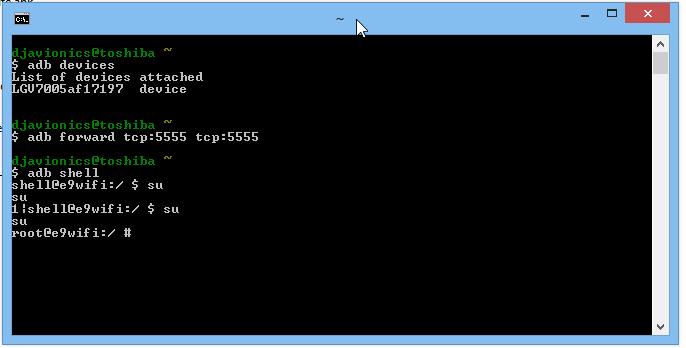
3) We hope you already linked android-sdk to cygwin so open a cygwin terminal and type manually
adb forward tcp:5555 tcp:5555 and press INTRO. In windows 8.1 the copy and paste failed and we don't recommend copy/paste method for some buggy reason pretty hard to explain here.

4) Enter the command adb shell

5) Enter the command su
*If it is the first time, you have to grant permission by unlocking the screen and accepting any request made by the SUPERUSER If you missed, just re enter the command and next time the request will display on a tablet again, but for a few seconds.
Grant permission to SUPERUSER by unlocking the screen.
 
Finally you will end with a screen like this.


6) Enter the command (but for me only worked if I wrote manually):
/system/xbin/busybox nc -l -p 5555 -e /system/xbin/busybox dd if=/dev/block/mmcblk0p34
*nothing special happens, mmcblk_p__ could be differentl some tutorials will tell you to dump the entire flash memory and others will explain how to figure out which number is the partition containing your personal data.

7) Open another cygwin instance by clicking the shortcut again and enter:
a) adb forward tcp:5555 tcp:5555
*nothing happens

b) cd /nexus

c) nc 127.0.0.1 5555 | pv -i 0.5 > mmcblk0p34.raw
 * Vertical Bar is alt+0124, source website.
* and you should see some flowing logs like:
Cygwin32 can run more than one instance for this job. You don't need cygwin64 in 64-but Windows OS
And this could take some time, between half an hour and 45 minutes.

Then you can open a command prompt at android sdk platform tools folder to "eject" the tablet, in our test we just unplug it without risks but if you want to:


8) Finally you will end with a big file with around 11GB in size that you must convert with vhdtool.exe, again, using a command prompt. This will make the raw file we have just created readable by Windows. The process takes a few miliseconds!
The process of converting the raw file takes no time.
9) Go to Nexus directory (the source website was recovering files from a nexus tablet so, it kept as it) where you must have the vhdtool (it is just a portable exe) and the mmcblk0p34.raw and open a command prompt to run the command: vhdtool /convert mmcblk0p34.raw
VHDTool.exe will do the trick
As shown before, the process is inmediate.
10) Open the disk management console and attach a new vhd:
a) For sure you don't need help where to find the disk management console of Windows


b) Browse for the file

c) Select from the drop menu not to filter any extension *.* and open it.


d) Click OK!


e) Oops, this error could happen in Windows 8.1
 f) Enable show hidden extensions and rename it from *.raw to *.vhd, don't care about the warning about changing the filename extension.
f) Enable show hidden extensions and rename it from *.raw to *.vhd


g) Now you should be able to attach the vhd so repeat the process and initialize it as shown here:
h) Select GPT partition


i) Right Click over the disk to create a new volume with that information, without formatting, with default allocation size.
i) Create a new volume with that information, without formatting, with default allocation size.

j) Cancel the pop-up once new volume and letter are ready.

11) Now go to My Computer and look for the new drive, format with default allocation size iin FAT32, using quick mode!

12) Your drive should be ready to be scanned by Recuva. We don't recommend using another software as getdataback for fat because they don't have simple user interface, lot of options and in exchange this one will do the job with ease.

Monday, July 30, 2018

Downgrade lollipop a KitKat, LG v700

Al 2018 esta tablet quadcore de 1.2 GHz paso del ser equivalente a un celular De tope de gama en la fecha de su lanzamiento a ser una carreta cargada y con las ruedas pinchadas! Usamos la actualización a lollipop y esto no da para mas, volveremos a KitKat que aunque también lento, esa "latency" es mas que aceptable. En lollipop por ejemplo, cambiar de usuario puede hacer que la tableta se cuelgue y haya que reiniciar.

Empecemos!
Primero de todo, los backups. El downgrade hará un wipe total sin posibilidad de recuperación de datos posterior, sobrescribiendo todo el espacio vacio con ceros y unos.

1) Bookmarks de google Chrome con Superbackup. Si tenemos Chrome beta no podremos respaldar los a no ser que hagamos un screenshot o los copiemos y pegumos manualmente en el anotador.

2) QuickMemos Nuestro self Services backups será de una versión posterior a KitKat por lo que es probable que no nos sirvan los datos de un lbf de lollipop en KitKat. Deberemos guardar manualmente los datos de quickmemo, exportando a la memoria microsd desde la interfaz del programa!

2) Apps descargadas; si teníamos Super Backup (v2.2.09) desde el primer momento, esta aplicación hace backups del apk de cada app que nos bajemos y es muy útil tener los instaladores apk listos en el siguiente formateo y no estar bajando todo de nuevo.
Con ES File Explorer podemos pasar al PC los .apk respaldados por "Super Backup"

3) Homescreen; ubicacion de los elementos del escritorio y fondo de pantalla. El servicio offline integrado de LG para hacer backups tiene esta posibilidad pero como pasaremos a otra versión de Android probaremos utilizando el backup manual del escritorio;
Escritorio de Android 5.0.2 Lollipop
Acaabremos con 3 achivos creados en simulateaneo los cules seran nuestro backup del escritorio
 4) Carpeta DOWNLOADS; Es recomendable ordenar todos los archivos descargados desde internet pero si no es posible, respaldar la carpeta entera es una buena opcion.

5) Carpeta VoiceRecorder; Aunque la utilidad de backup integrada ofrece guardar estos archivos en el lbf, como estamos cmbiando de versiones mejor es respaldar toda la carpeta manualmente, cuidado que puede que los archivos no contengan metadata o se nombren simplemente por recording count y no por fecha y hora estilo 20181224_00-00 por lo que debes fijarte de anotar las horas de las grabaciones o cuando las pases al pc van a tener fecha y hora del copy paste y no la fecha original.

6) Quickmemo+ Folder; En esta carpeta se pueden guardar archivos complementarios como imagenes creadas por esta aplicacion, respaldar la carpeta entera.

7) Y antes de formatear, proba si el juego que antes no te andaba ahora te anda! (CSR Street Racing2)
Probado: Failed... El juego llega a cargar la musica y algunos logos pero se cierra solo sin llegar a la pantalla principal.

8) Rootea la tablet

9) Instala BusyBox para hacer un dump de la particion de datos por si despues queres recuperar algo.

Tuesday, July 24, 2018

Editando un video en tiempo real desde cero, from raw to streaming service.

Hay muchisimas formas de editar un video, muchas de pago y otras gratuitas, por ejemplo sacarle el polvo a una vieja copia de Adobe Premiere que tengamos guardada e intentar editar un video grabado con nuestro smartphone android usualmente con el codec .h264.

El primer problema con el que nos vamos a enfrentar es que Adobe no soporta la importacion de archivos en contenedores mp4 por lo que tenemos un par de alternativas a considerar:

Convertir con WinAVI 7 o 8 nuestro video a Lagarith en contenedor AVI, este codec es Loseless y suele venir en K-Lite Codec Pack en su version MEGA (para este tutorial pasaremos de la 8.8.0 standard a la 1010 mega):
Step 1 - Instalar K-Lite v10.0.1

Siempre elegir "Advanced".

Seleccionando el directorio


Implementar aceleracion por hardware, puede no ser muy efectivo
 Y los screens que no aparecen, solo poner "siguiente".


 Asimismo debemos convertir o seleccionar en este paso el audio de salida en Wave PCM uno de los formatos mas faciles de trabajar. Es posible que Adobe Premiere o bien lo acepte o aparezca el video inutilizable, en donde debemos abrir el raw con VirtualDub y recodificarlo en el mismo formato Lossless. Incluso habiendo logrado este paso, al importar a adobe premiere puede aparecer ruido digital al volver a exportar nuestro trabajo al mismo codec.


La segunda alternativa es utilizar h264 lossless audio PCM Wav en contenedor avi, usando esta opcion no se observa la aparicion de ruido digital en el audio ambiente de nuestro clip. Cual es la desventaja? Dudo que exista un formato lossless en h264 y la ultima vez que googleamos no obtuvimos respuestas concretas.

Preparando nuestros archivos (Asegurarse de contar con mucho espacio en disco)

Abrir nuestro RAW h264 bajado desde nuestro smarphone con WinAVI 8 Converter  y elegir la opcion "AVI" como se muestra en el screenshot abajo.
El primer paso es convertir el raw bajado desde nuestro smartphone.


Abrimos los parametros de configuracion donde nos da a elegir el encoder de video y audio, para video usamos el codec "Lagarith Lossless Codec" y para la pista de audio "ZJMedia Uncompress PCM". En el primer caso podemos clicar en el boton de los puntos suspensivos y habilitar multithreading que supuestamente es para utilizar todos los nucleos que tu procesador tenga. En nuestras pruebas no vimos diferencia apreciable entre tener o no activada esta opcion, en un caso la codificacion estimó un tiempo de 14 minutos y con multicore 12 minutos.
Segun la duracion del video nos puede dar unos 30 gigas cada 20 minutos al usar "Lagarith".
Antes de seguir con el tutorial podemos leer este enlace externo sobre la diferencia entre Average Bit Rate y Constant Rate Factor.

ABR vs Constant Rate (External Link for reference)


Una vez finalizada la codificacion vamos a tener un archivo bastante grande pero para ser lossless es un tamaño mas que aceptable. Si eligieramos video sin comprimir en FULL HD tendriamos 2mb por cada frame, si el video tiene 30fps serian 60MB por segundo de video o 3.6GB por minuto ya que cada frame seria como tener un archivo de imagen de mapa de bits, y son solo valores estimados minimos.


To be continuated...

Friday, July 13, 2018

Sony Xperia m5 dual upgrade to marshmallow, a disaster! (Almost)

Forger about upgrading your xperia to marshmallow, better just make a hard reset or factory reset and see if the system's corrects itself.

Some strange behavior started with our Sony xperia m5 dual and we decided to give marshmallow official update a chance. Bad idea. Our battery was damaged before and now it is almost over. Power consumption is lot higher than in lollypop and don't forget that replacing the boot loader is a very difficult process involving requesting some code to Sony corporation and they warn you that you'll or could loose key functions as those related to low light sensibility for the camera.

Now we are trying to figure out how to downgrade this time with stock ROM from some Russian hackers without having to unlock the boot loader or root the device.

I can't say the camera is better perhaps ISO sensibility is better for still images but I don't like the GUI and video under low light it is still bad.

Hope our stock ROM we got work as good as lollipop 5.0 correct me if that was not the version which come with brand new xperia. The version you can find on the internet is lollipop 5.1

Upgrading to lollipop, not really worth it. LG v700

A few weeks ago we treated how to recover the system of a v700 tablet from the southkorean brand. After using it for that amount of time we realized it is not worth keep in this android version. Let's mention the pros and cons now;

Pros:
- IR Blaster for QuickRemote still works with the tablet being encrypted.
- FTP now does work with NoRoot Firewall on.

Cons:
- Now dual band WiFi doesn't work, only 2.4ghz
- Higher power consumption
- Higher resources consumption
- Higher rate of "snaps" when loading websites with bad optimized javascript. (Chrome)
- incognito mode still crashes the browser without possibility of recovering browsong sessionsession (chrome).
- LG virtual keyboard is terrible bad and useless it even obstructs the vision under any condition. (Split landscape mode)
- ES File Explorer still crashes when loading movies thru FTP (both old and new versions)
Do you mind to update to lollipop? Better don"t


Jumpstarting a drained Toshiba C-50 ASP53xx Battery (Type:PA5024U)

Good News I was able to jumpstart the battery pack that I thought I was going to replace again at 50usd cost. This battery ended up to be of...