Total Pageviews

Saturday, November 24, 2018

Facebook and its common advances against the freedom of speech

If you posted your net radio stream url / ip, now you are done. Zuckerberg has decided to suppress every post without any warning containing a shoutcast stream ip.  The post is:

"Now playing 24/Nov 11:00p.m. (GMT-3) "THE RUSH" 303, by the American DJ PESTY a.k.a. Steven Hardy.
To listen NetRadio ENERGY (Argentina);
1) Visit with your android phone the address http://emisoraenergy.listen2myradio.com/ so you can listen to the radio directly from the web!
2) Or with the link http://162.210.196.145:3137/listen.pls using VLC for Android. Also works for Winamp and Windows Media on PC. (In Windows 8.1 *.wpl is not working if no codec pack like K-Lite is yet not installed)

Desktop Version URL: www.nrg.dx.am
Mobile Version Tiny URL: www.nrg.dx.am/m (This don't work in a PC browser)
nrgmultimedios@gmail.com
Warning: Several posts from August to November had disappeared, we think facebook censoring us because between those months we attached a request for solidarity for a kidnapped child of our resident DJ, Avionics and this social network supports everything related or against the left wing agenda"

We were wondering last days what happened to our posts between August and November and in a shortly investigation we discover if we exclude the stream ip of Net Radio ENERGY (Argentina), the post pass, if not, you get:

"Sorry, something went wrong.

We are working on it and we'll get it fixed as soon as we can."


Attempting to publish a full post of  DJ show which includes 
Shoutcast IP Address. (m.facebook.com)(img.1)
But at the time we are writing this article now we are getting an specific error! It depends whether you are posting using m.facebook, if you include only the ip address of the shoutcast stream or add some text like "test".

But, hold on why are you posting using the mobile version while using a full desktop PC? Weeell, is quite obvious programmers make scripts and software every time and every day more dense and worse optimized and at the time of writing this article (11/24/2018) it's almost imposible to view anything within facebook on desktops. It does not matter if you are using Chrome or Firefox, loading times are ridiculously slow. Perhaps if you have +10mbps internet connection and high-end PC or laptop, only if you have that, perhaps you will be able to view and use the desktop version of Facebook Social Network. Not even say that the entire website has almost the same million lines of code as Windows 10. In our case we are writing using a modest laptop with a dual core Intel CPU and 4gigs of RAM, you can even play Half-Life 2 without any problems!! But facebook? Don't talk about it! Nowadays vast majority of users visit the website by the app for Android and iOS. Do you wanna hear more? If you post too much text in there, lags becomes a problem. In the case of the adverts of weekly podcasts of our net radio, the text is already a copy and paste where little things are being modified or edited every time.

Attempting to publish a full post of  DJ show which includes
Shoutcast IP Address. (m.facebook.com) (img.2)

Wednesday, October 10, 2018

Torrent Sony Vegas, full of viruses warning!

https://www.limetorrents.info/Sony-Vegas-Pro-15-0-0-Build-384-%20-patch-torrent-11160300.html
that link contains a fake sony vegas installer infested with trojan and viruses, keep away from that.

Thursday, October 4, 2018

Factory Reset Bravia KDL-32W655A for Youtube App Fix, hangs, freezes, stuck.

Factory Reset Bravia KDL-32W655A for Youtube App Fix, useful when it hangs, freezes, or get stuck.

This can happen, better said is a known bug where SONY is the culprit. The problem happens when you link your smartphone with the TV to play content with it. When you click on the mini tv icon with w

Wednesday, October 3, 2018

Missing share button on facebook, its official, censorship is the cause!

Since various years ago we were noticing that share button on our posts categorized as "friends only" began no dissappear. Some times and time to time a friend of you for aure told about sharing button not appearihn as usual. Well, this wasn't some hidden function in privacy options not even one you can access only thru facebook for desktop. It was the beggining of a strategy for the common censorship goal the company from palo alto used us to be, the increase in the censorship of the largest social network available. We were analyzing wheter is necessary or not to implement "legally" the supression of the share button when you share something to friends only. And the analisys we have made give us the result this is not a tecnical featuere but another step from facebook to censor us and to make the opposite we want as users from the site. Not even talking about facebook for dekstop is almoat impossible to use flawsly and the vast majority use the app for android but the app doesn't have all the options you found in the desktop version. Or example custom privacy levels in your post, you have some useless levels for example share the post with users in your area. That never worked for me. Facebook didn't make this change in our benefit but only thinking in their. Someone would be thinking "perhaps Facebook wanna protect yor privacy and not making possible sharing a post intended for your friends only to go semi-public if friends of friends start to share it till is completely viewed by your entire city". That could be a good reason for this major change but dont trust them, the purpose is biassed. If the post you make is intended for friends only they could simply give you the decision whether to hide or show the button or if it is better, allow to hide the original poster in case it goes viral. In a common case, a guy has some of his relative in friends but he doesnt wanna have his direct relatives as a brother or sister with no very good relationship. So, making sharable a post to your friends only is legit, you dont wanna make it friends of friends because your relative for sure will have in his list your sisters'. And in this case, your sister will be able to see your post and you imagine... if you dont have a good relationship that could led to discussion.

So right now the only thing you can do is to change the public to friends of friends (you can do this only in desktop version) or worse, make it public. Then the missing button will show up.


Wednesday, September 26, 2018

What you don't wanna loose after a hard-reset or smartphone full O.S. reinstall

What you don't wanna lose after a hard-reset or smartphone full O.S. reinstall


Here we help you not to forget backing up these things when you flash or perform a factory or hard-reset in your Android Device:


1) Wi-Fi Settings
If you travel often, you don't wanna lose those memories about the wifi from your hotel!

2) Check if your whatsapp associated line is still active
In case you've changed your phone and line number for new ones, take care about the expiring date of your SIM due to inactivity, in Argentina this time is not very clear, sometimes a simcard can be offline for months and be still active, and sometimes in two months your old phone number has gone. If you hardreset your device, the whatsapp number must be verified again and if your simcard is expired, you won't be able to view your old messages in your old phone again, databases for these are encrypted in an unknown format and at the moment we don't know any method of decypting those "msgstore" files.You cannot copy the backed up whatsapp folder from your PC to the internal storage and restore this backup activating whatsapp for the first time using another phone number but only the last associated one. If the phone number entered when activating whatsapp matches with the backup previously copied to the internal storage, a prompt will appear and you will be able to restore all the messages. If the backup does not match with the entered number, nothing will appear and the backup will be overwritten.

3) Pictures
You cannot choose where to save the screenshots, so be sure you backup them.

3) Recordings
If you use built-in recording app you'll wanna backup the entire folder to your harddrive.

Tuesday, August 21, 2018

Don't download nor upload anything to MEGA, it could hog your network and it's not free!

Several downloads or file sharing services are around there but for example, some firmwares are being uploaded to the site MEGA and the last time I revisited that, my whole upload bandwidth was eaten by the site using Firefox. I don't know, but they use some weird way for downloading via browser cache so you can't use a download accelerator and you could be shutlinked at any moment according to the "traffic" on that service. Better use uTorrent. For example now I'm sharing the E5633 lollipop russia generic (android 5.1) at:

http://scrv-zapto.org/public/E5633_30.1.B.1.55_R3A_Russia Generic_1297-3945.ftf.torrent
http://scrv-zapto.org/public/E5633_30.1.B.1.55_R3A_Russia Generic_1297-3945.ftf.torrenthttp://scrv-zapto.org/public/E5633_30.1.B.1.55_R3A_Russia Generic_1297-3945.ftf.torrent
E5633_30.1.B.1.55_R3A_Russia Generic_1297-3945.ftf.torrent


MEGA File Sharing Service is not Free! Avoid it.
Update: Posting to NRG Tech Tips ftf firmware for Xperia E5663
Source: http://www.xperiablog.net/forum/resources/xperia-m5-dual_e5663_30-1-b-1-33_india_generic.558/
Download Link: https://mega.nz/#!opgX1YRK!urL6_i1esm_nD-tiwyinzICgMGGkSU33HaxNclu246Q

Mirror: E5663_30.1.B.1.33_R7A_India Generic_1298-2221.ftf.torrent
We couldn't find the stock 5.1 firmware for Latin-America region, but we already tested the ftf of Android 5.0 (E5663_30.0.B.1.33_1297-3937_Customized-MY). When flashing to the phone some warnings appeared and the overall functions are totally fine, no issues except the built-in software updater is not working, the app downloaded update package from 5.0 to android 5.1 but when applying it, the android robot appears on the screen but immediately the Xperia M5 Dual restarts and failed to update the software.

Full directory: http://scrv.zapto.org/public/

So next step is as we saw in some forum, install the update using the full firware we are sharing here but not checking "wipe userdata" and see if personal data remains. Do not try this at home, at least not without making a backup. And if your battery is fine, we don't recommend updating the firmware when it is working in normal condition. Yeah, we know, 5.1 update comes with several bug fixes and makes the phone more battery efficient, but perhaps is not worth the risk or loosing files or even, hope never happens to you, brick it.


http://scrv-zapto.org/public/E5633_30.1.B.1.55_R3A_Russia Generic_1297-3945.ftf.torrent

http://scrv-zapto.org/public/E5633_30.1.B.1.55_R3A_Russia Generic_1297-3945.ftf.torrent

Friday, August 3, 2018

Dump for recovery v700 (Must be rooted)

In this tutorial you will learn how to root a LG tablet with LGONECLICKROOT and then how to dump the bulk data from internal storage partition to your PC. Let's start with the first and most tedious part, rooting and using cygwin, which must be linked to adb by using one or two methods available, This is not a very effective process but we doubt anyone of us have a FBI lab to read the contents of the memory directly with forensic equipment.

If you are getting the stuck screen at command prompt "SPECIAL COMMAND" like the one below it could be due to encryption. First decrypt the tablet doing a complete backup because you could loose all your files in the process if something happens.
Stuck at "Special Command, enter, leave".
By decrypting the tablet, it didn't stuck at the same screen but in the end of the running screen you are asked to type somehing.

1) Next step is to install BusyBox for Android, probably you don't need help here.

2) Once installed, re-encrypt the tablet including empty space sectors (FULL ENCRYPTION) and when the process is done connect the tablet to pc.

3) We hope you already linked android-sdk to cygwin so open a cygwin terminal and type manually
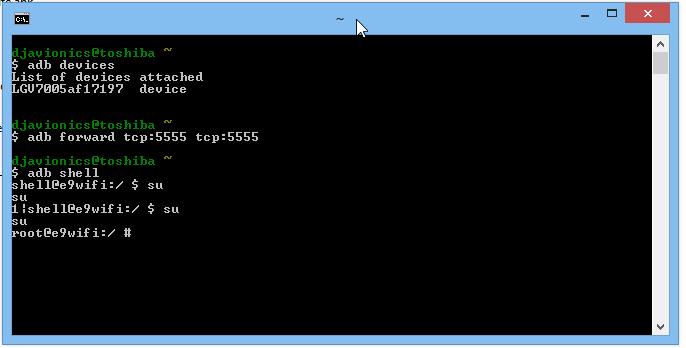
adb forward tcp:5555 tcp:5555 and press INTRO. In windows 8.1 the copy and paste failed and we don't recommend copy/paste method for some buggy reason pretty hard to explain here.

4) Enter the command adb shell

5) Enter the command su
*If it is the first time, you have to grant permission by unlocking the screen and accepting any request made by the SUPERUSER If you missed, just re enter the command and next time the request will display on a tablet again, but for a few seconds.
Grant permission to SUPERUSER by unlocking the screen.
 
Finally you will end with a screen like this.


6) Enter the command (but for me only worked if I wrote manually):
/system/xbin/busybox nc -l -p 5555 -e /system/xbin/busybox dd if=/dev/block/mmcblk0p34
*nothing special happens, mmcblk_p__ could be differentl some tutorials will tell you to dump the entire flash memory and others will explain how to figure out which number is the partition containing your personal data.

7) Open another cygwin instance by clicking the shortcut again and enter:
a) adb forward tcp:5555 tcp:5555
*nothing happens

b) cd /nexus

c) nc 127.0.0.1 5555 | pv -i 0.5 > mmcblk0p34.raw
 * Vertical Bar is alt+0124, source website.
* and you should see some flowing logs like:
Cygwin32 can run more than one instance for this job. You don't need cygwin64 in 64-but Windows OS
And this could take some time, between half an hour and 45 minutes.

Then you can open a command prompt at android sdk platform tools folder to "eject" the tablet, in our test we just unplug it without risks but if you want to:


8) Finally you will end with a big file with around 11GB in size that you must convert with vhdtool.exe, again, using a command prompt. This will make the raw file we have just created readable by Windows. The process takes a few miliseconds!
The process of converting the raw file takes no time.
9) Go to Nexus directory (the source website was recovering files from a nexus tablet so, it kept as it) where you must have the vhdtool (it is just a portable exe) and the mmcblk0p34.raw and open a command prompt to run the command: vhdtool /convert mmcblk0p34.raw
VHDTool.exe will do the trick
As shown before, the process is inmediate.
10) Open the disk management console and attach a new vhd:
a) For sure you don't need help where to find the disk management console of Windows


b) Browse for the file

c) Select from the drop menu not to filter any extension *.* and open it.


d) Click OK!


e) Oops, this error could happen in Windows 8.1
 f) Enable show hidden extensions and rename it from *.raw to *.vhd, don't care about the warning about changing the filename extension.
f) Enable show hidden extensions and rename it from *.raw to *.vhd


g) Now you should be able to attach the vhd so repeat the process and initialize it as shown here:
h) Select GPT partition


i) Right Click over the disk to create a new volume with that information, without formatting, with default allocation size.
i) Create a new volume with that information, without formatting, with default allocation size.

j) Cancel the pop-up once new volume and letter are ready.

11) Now go to My Computer and look for the new drive, format with default allocation size iin FAT32, using quick mode!

12) Your drive should be ready to be scanned by Recuva. We don't recommend using another software as getdataback for fat because they don't have simple user interface, lot of options and in exchange this one will do the job with ease.

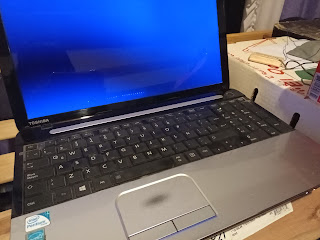
Jumpstarting a drained Toshiba C-50 ASP53xx Battery (Type:PA5024U)

Good News I was able to jumpstart the battery pack that I thought I was going to replace again at 50usd cost. This battery ended up to be of...